

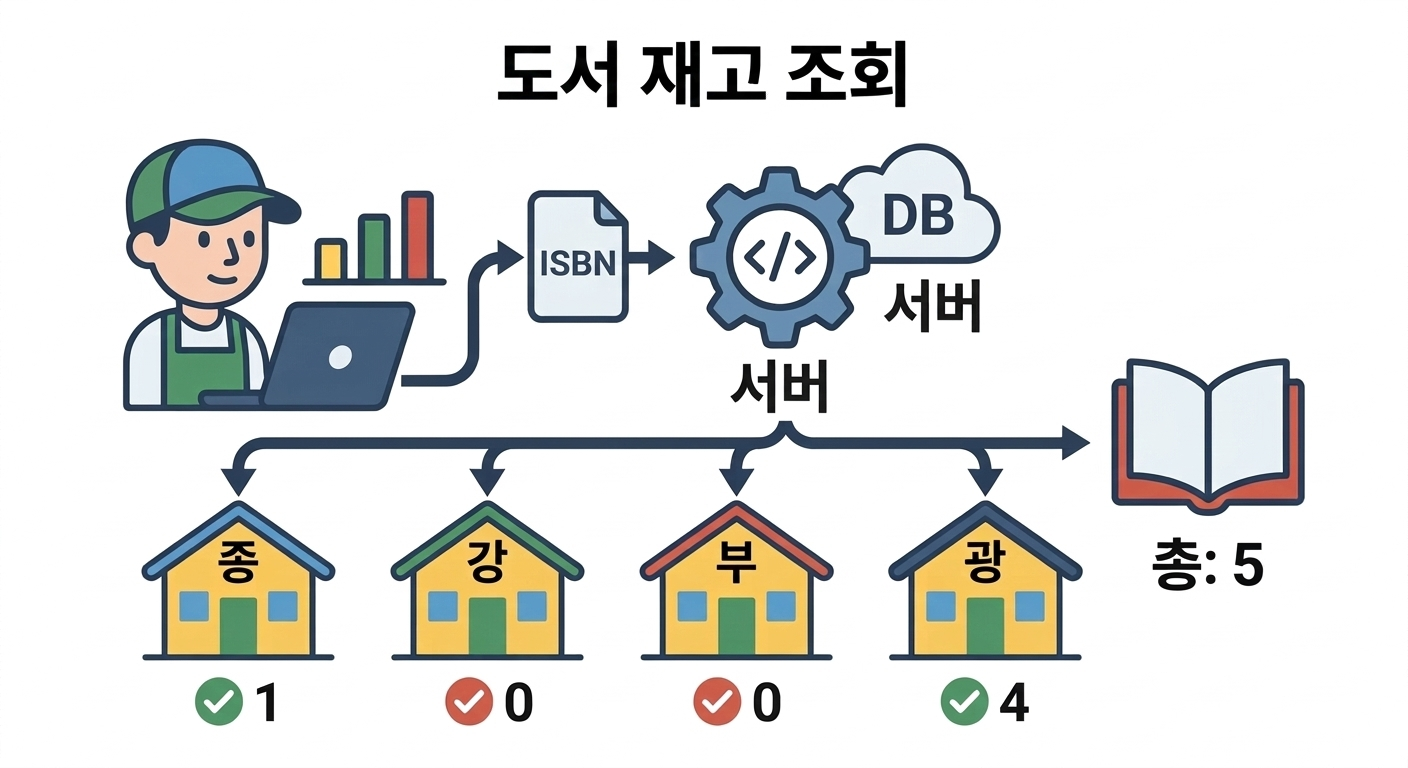
VBA를 이용해서 Http로 서점 서버에 접속해서
시트상에 나열된 ISBN 목록에 대해 각 지점의 재고현황 데이터를 JSON 형식으로 받아서
엑셀 시트에 일괄로 정리하는 사례입니다.

교보문고의 사례입니다. 책 상세 페이지에서 '매장 재고. 위치'를 눌렀을 때 아래와 같이 조회됩니다.
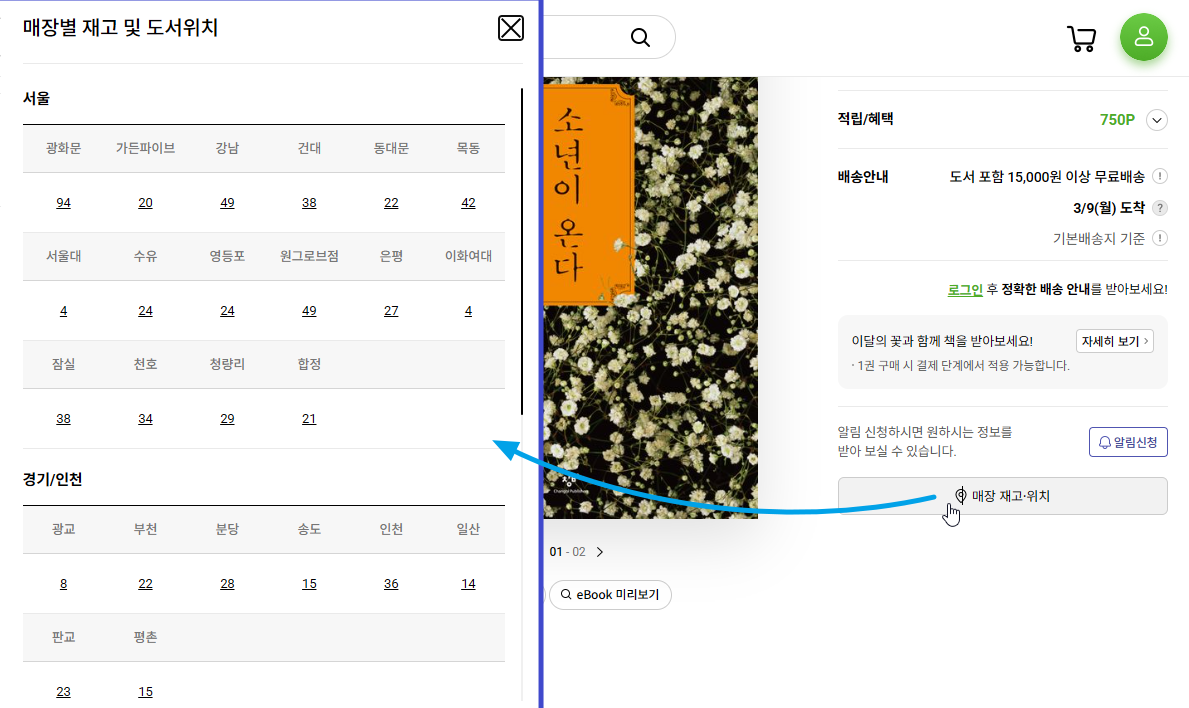
매장 재고 URL은 아래처럼 S000000610612 같은 상품코드를 필요로 합니다.
https://product.kyobobook.co.kr/api/gw/pdt/product/S000000610612/location-inventory
내부 JSON 데이터상에서 saleCmdtid 라는 값인데
ISBN으로 검색하는 상황이므로 바로 상품코드로 조회할 수는 없습니다.
최초에 13자리 ISBN (9788936434120)으로 검색했을 때 내부적인 상품코드인 S000000610612 라는 값을 구해야 합니다.
교보문고는 검색 Input 창에 ISBN 을 입력하면 실시간으로 도서 정보를 가져옵니다.
https://search.kyobobook.co.kr/srp/api/v2/search/autocomplete/shop?keyword=9788936434120
그래서 이렇게 실시간 검색 주소를 이용해서 Json("data")("resultDocuments")(0)("sale_CMDTID") 값을 구하거나

https://www.kyobobook.co.kr/api/gw/aco/search/commodity?keyword=9788936434120&gbCode=TOT&page=1
또는 이렇게 검색해서 Json("data")("resultDocuments")(0)("sale_CMDTID") 값을 구하면 됩니다.

그런데 간혹 1차 실시간 JSON 데이터로는 검색이 되지 않지만 결과가 넘어오는 경우가 있는데 그때는 HTML 문서에서 찾아와야 합니다.
https://search.kyobobook.co.kr/search?keyword=9788936434120&gbCode=TOT&target=total
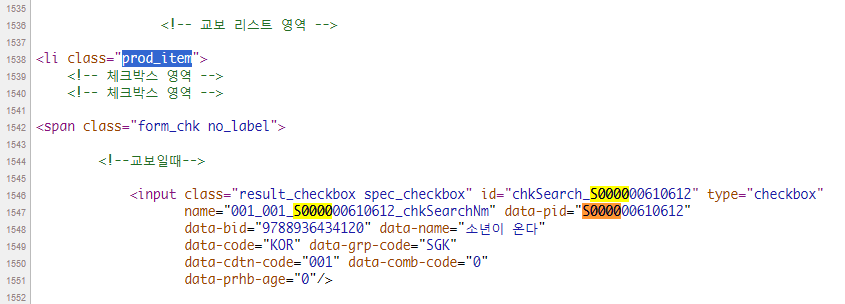
위 처럼 접속해서 HTML 문서 상에 검색된 도서중에서 prod_item 목록 중 input 태그의 data-pid 속성값에 S000000610612 을 구할 수 있습니다. 물론 표지 이미지 파일명에서 가져올 수도 있습니다.
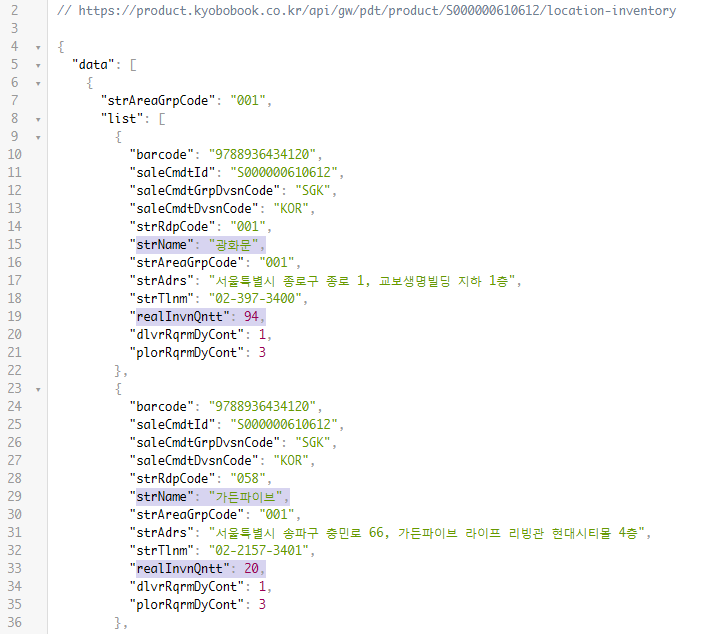
이제 최종적으로 https://product.kyobobook.co.kr/api/gw/pdt/product/S000000610612/location-inventory 이런 주소로 접속해서 매장별 재고 숫자를 가져옵니다.
접속해서 받아온 JSON 데이터에서 Json("data")("list")의 배열 데이터중에서 각 배열 데이터내의
strName 은 매장위치이고 realInvnQntt 는 재고 수량이 되겠습니다.
위 과정에 대한 VBA 코드는 아래와 같습니다.
Option Explicit

Dim http As Object  'New MSXML2.ServerXMLHTTP60
Dim html As New MSHTML.HTMLDocument '도구 > 참조 : Microsoft HTML Object Library 체크 필요
Dim Json As New JsonBag, itm As New JsonBag, lst As New JsonBag

Sub getKyobo()

    Dim sht As Worksheet
    Dim lastrow As Long, lastcol As Long, l As Long
    Dim rng As Range, irng As Range
    Dim ret As Long

    Set sht = ActiveSheet
    lastrow = sht.Cells(sht.Rows.Count, "A").End(xlUp).Row
    If lastrow < 2 Then Exit Sub
    lastcol = sht.Cells(1, sht.Columns.Count).End(xlToLeft).Column
    If lastcol < 2 Then Exit Sub

    'Application.ScreenUpdating = False
    Set http = CreateObject("MSXML2.ServerXMLHttp")
    If html Is Nothing Then MsgBox "Alt+F11창에서 도구>참조> Microsoft HTML Object Library에 체크하세요.": Exit Sub

    On Error Resume Next
    For Each rng In sht.Range("A2:A" & lastrow)
        rng.NumberFormat = "@"
        If Not ValidateISBN(rng.Value) Then
            rng.Font.Color = rgbRed
        Else
            rng.Hyperlinks.Delete
            rng.Offset(, 1).Resize(1, lastcol).Clear
            Call getKyoBobooks(rng)
            l = l + 1
            Application.StatusBar = "Processing : " & l & " / " & lastrow - 1
            If l Mod 5 = 0 Then Application.Wait (Now + TimeSerial(0, 0, 1))
        End If
        rng.HorizontalAlignment = Excel.Constants.xlCenter
    Next rng
    Application.ScreenUpdating = True
    Set http = Nothing
    Set html = Nothing
    Application.StatusBar = False
End Sub

Private Sub test()
    Set http = CreateObject("MSXML2.ServerXMLHttp")
    Debug.Print getKyoBobooks(ActiveCell)

    Set http = Nothing
End Sub

Function getKyoBobooks(ISBN As Range) As Long

    Dim url As String, arr() As String
    Dim Loc As Range
    Dim oSht As Worksheet
    Dim lastcol As Integer, l As Integer, I As Integer
    Dim SaleCode As String, temp As String

    Set oSht = ISBN.Parent
    lastcol = oSht.Cells(1, oSht.Columns.Count).End(xlToLeft).Column

    'sale_CCMDTID
        'https://www.kyobobook.co.kr/api/gw/aco/search/commodity?keyword=9788954682152&gbCode=TOT&page=1
    '    {
    '    "data": {
    '    "returnCode": 1,
    '    "errorMessage": null,
    '    "resultDocuments": [
    '      {
    '        "chrc_NAME": "한강",
    '        "sale_CMDT_DVSN_CODE": "KOR",
    '        "cmdtcode": "9788954682152",
    '        "pbcm_NAME": "문학동네",
    '        "sale_CMDT_PRCE": "16800",
    '        "img_URL": "https://contents.kyobobook.co.kr/sih/fit-in/200x0/pdt/9788954682152.jpg",
    '        "sale_CMDTID": "S000000781116",
    '        "cmdt_NAME": "작별하지 않는다",
    '        "score": "102312",

    'URL = "https://search.kyobobook.co.kr/srp/api/v1/search/autocomplete/shop?callback=autocompleteShop&keyword=" & ISBN.Text
    url = "https://www.kyobobook.co.kr/api/gw/aco/search/commodity?keyword=" & ISBN.Text & "&gbCode=TOT&page=1"
    'URL = "https://www.kyobobook.co.kr/api/gw/aco/search/commodity?keyword=" & ISBN.Text & "&gbCode=kyobo&page=1"
    'Debug.Print URL

    With http
            .Open "GET", url, False
            .setRequestHeader "User-Agent", "Mozilla/5.0 (Windows NT 10.0; Win64; x64) AppleWebKit/537.36 (KHTML, like Gecko) Chrome/127.0.0.0 Safari/537.36"       '"Mobile"
            '.setRequestHeader "Content-Type", "Application / javascript"
            .send
            temp = .responseText
            Json.Json = temp
            'Debug.Print temp
    End With

    '검색되지 않은 경우 HTML 검색
    If Json("data")("resultDocuments").Count < 1 Then
        url = "https://search.kyobobook.co.kr/search?keyword=" & ISBN.Text & "&gbCode=TOT&target=total"
        With http
            .Open "GET", url, False
            .setRequestHeader "User-Agent", "Mozilla/5.0 (Windows NT 10.0; Win64; x64) AppleWebKit/537.36 (KHTML, like Gecko) Chrome/127.0.0.0 Safari/537.36"       '"Mobile"
            '.setRequestHeader "Content-Type", "Application / javascript"
            .send
            temp = .responseText
            html.body.innerHTML = temp
            'Debug.Print temp
        End With

        SaleCode = ""
        On Error Resume Next
        SaleCode = html.querySelector(".prod_item > span > input").getAttribute("data-pid")
        On Error GoTo 0
        'Debug.Print ISBN, SaleCode

        If Len(SaleCode) > 0 Then
            ISBN.Hyperlinks.Add ISBN, Address:="https://product.kyobobook.co.kr/detail/" & SaleCode, ScreenTip:="▶ ISBN Found >> but no data"
            ISBN.Font.Color = rgbBlue
        Else
            ISBN.Hyperlinks.Add ISBN, Address:="https://www.google.co.kr/search?hl=ko&tbo=p&tbm=bks&q=isbn:" & ISBN, _
                ScreenTip:="▶ ISBN Not found" & " >> Search on Google"
            ISBN.Font.Color = rgbDarkOrange
            'Debug.Print "Not found : " & ISBN.Text
            getKyoBobooks = -1: Exit Function
        End If
    Else
        SaleCode = Json("data")("resultDocuments")(1)("sale_CMDTID")
        'Debug.Print SaleCode
        '요약 문자열 분리
        temp = Json("data")("resultDocuments")(1)("cmdt_NAME")
        temp = temp & ", " & Json("data")("resultDocuments")(1)("chrc_NAME")
        temp = temp & ", " & Json("data")("resultDocuments")(1)("sale_CMDT_PRCE")
        ISBN.Hyperlinks.Add ISBN, Address:="https://product.kyobobook.co.kr/detail/" & SaleCode, _
            ScreenTip:=temp

    End If


    url = "https://product.kyobobook.co.kr/api/gw/pdt/product/" & SaleCode & "/location-inventory"
   'Debug.Print URL
    With http
        .Open "GET", url, False
        .setRequestHeader "Accept", "application/json, text/plain, */*"
        .setRequestHeader "Content-Type", "application/json"
        .setRequestHeader "User-agent", "Mozilla/5.0"
        .send
        '{
        '    "data": [
        '        {
        '            "strAreaGrpCode": "001",
        '            "list": [
        '                {
        '                    "barcode": "9791169092753",
        '                    "saleCmdtId": "S000213845355",
        '                    "saleCmdtGrpDvsnCode": "SGK",
        '                    "saleCmdtDvsnCode": "KOR",
        '                    "strRdpCode": "001",
        '                    "strName": "광화문",
        '                    "strAreaGrpCode": "001",
        '                    "strAdrs": "서울특별시 종로구 종로 1, 교보생명빌딩 지하 1층",
        '                    "strTlnm": "02-397-3400",
        '                    "realInvnQntt": 85,
        '                    "dlvrRqrmDyCont": 0,
        '                    "plorRqrmDyCont": 0
        '                },
         Json.Json = .responseText
    End With

    If Json("data").Count = 0 Then getKyoBobooks = -1: Exit Function

    'Debug.Print Json.Json
    '처음인 경우 지점 목록 출력
    If ISBN.Row = 2 Then
        For Each lst In Json("data")
            For Each itm In lst("list")
                I = I + 1
                oSht.Range("A1").Offset(, I) = itm("strName")
            Next itm
        Next lst
        lastcol = oSht.Cells(1, oSht.Columns.Count).End(xlToLeft).Column
    End If

    '지점별 검색
    For Each Loc In oSht.Range("B1", oSht.Cells(1, lastcol))
        For Each lst In Json("data")
            For Each itm In lst("list")
                If itm("strName") = Loc Then
                    oSht.Cells(ISBN.Row, Loc.Column) = itm("realInvnQntt") '지점이름과 같으면 재고 현황 입력
                End If
            Next itm
        Next lst
    Next Loc


End Function
아래와 같이 주어진 ISBN 코드에 대한 각 매장별 재고 수량을 조회할 수 있습니다.
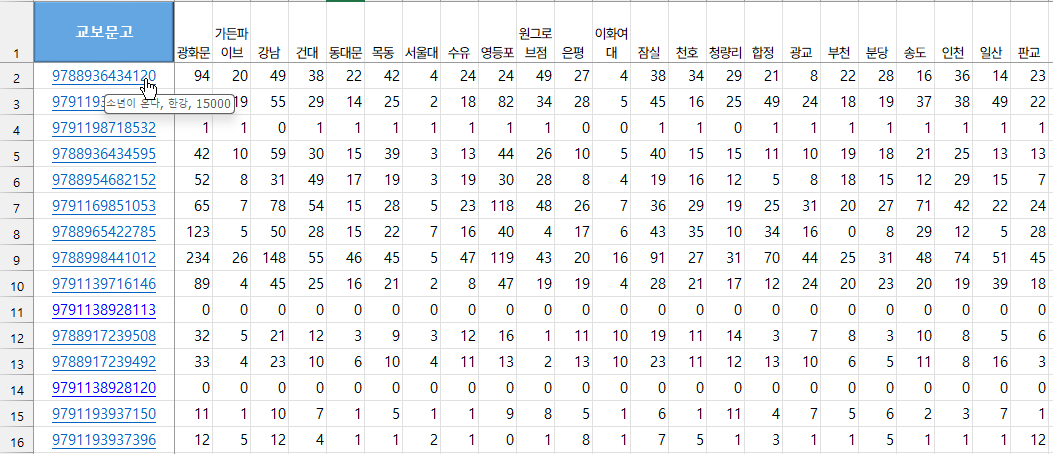
서버에 부담을 줄이기 위해 몇초마다 대기 시간을 주는 것이 좋겠습니다.
대량의 도서에 대한 검색은 정식 API를 이용해서 검색하거나 매장의 검색 시스템을 이용하는 것을 권장합니다.

이번에는 영풍문고 사례입니다.
ISBN 검색해서 상세 페이지로 이동 후 '매장 재고 및 위치 확인'을 눌러서 확인 합니다.
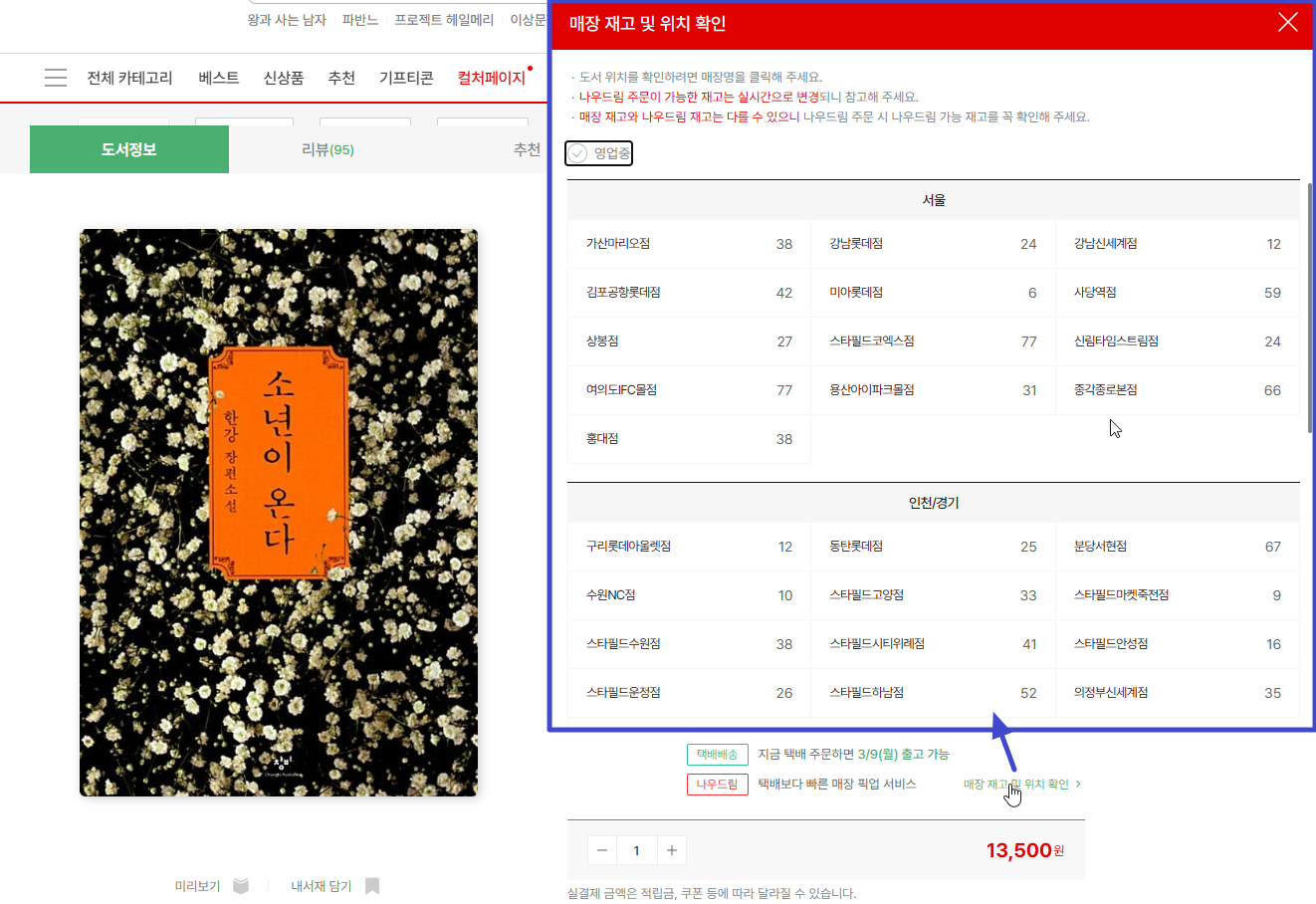
이렇게 JSON 데이터를 받아와야 하는데 iBookCd 값과 iNorPrc 가격 값이 필요합니다.
내부적인 상품코드가 필요합니다.
영풍문고도 검색 Input 란에 ISBN을 입력할 때 실시간으로 아래와 같은 도서 정보를 불러옵니다.
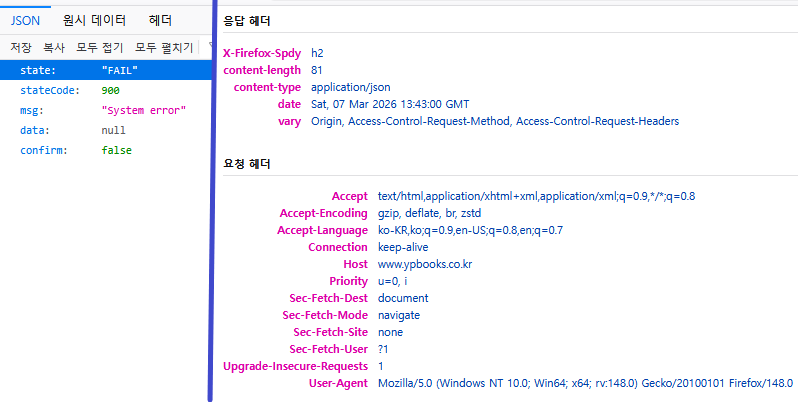
하지만 위 주소로 그냥 접속하면 아래처럼 JSON데이터가 돌아오지 않고 JSON 데이터 속에는 FAIL 값만 돌아옵니다.
좀 더 살펴보니 접속할 때 Guestaccesstoken 이라는 값이 없는 경우 FAIL 값을 돌려주고 있습니다.
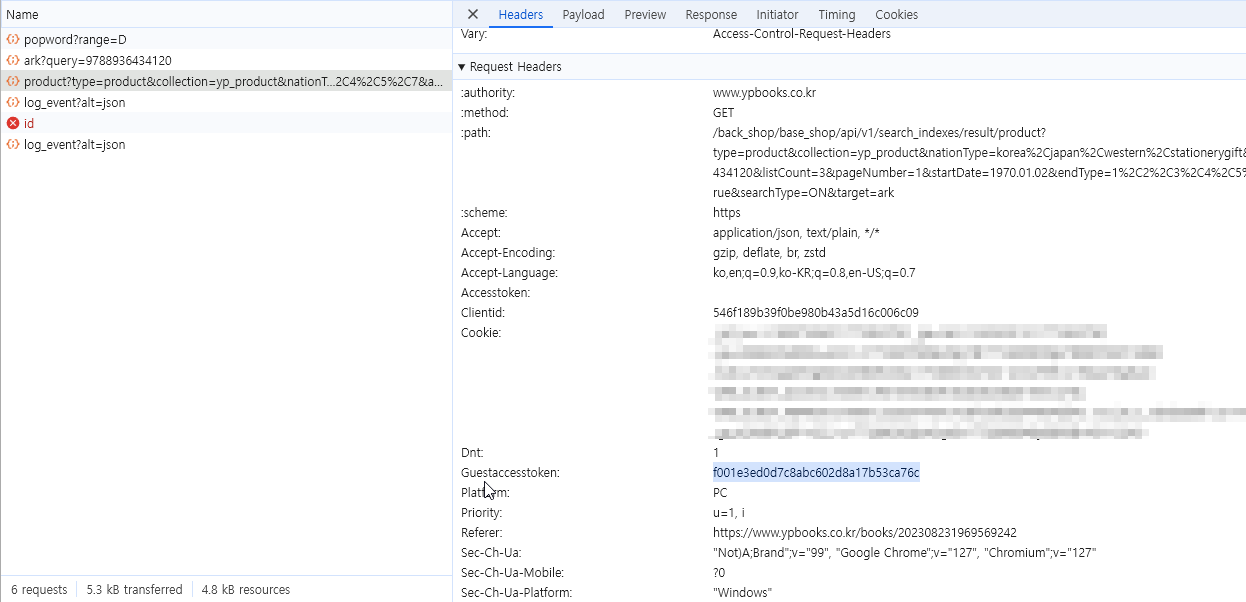
일단은 VBA에서 HTTP 접속할 때 RequestHeader 에 넣어주면 되는데
저 값은 접속하는 세션과 시간에 따라 달라집니다.
다행히 모바일로 접속할 때 AccessToken 값을 구할 수 있습니다.
https://m.ypbooks.co.kr/back_login/base_login/api/v1/auth/login-guest
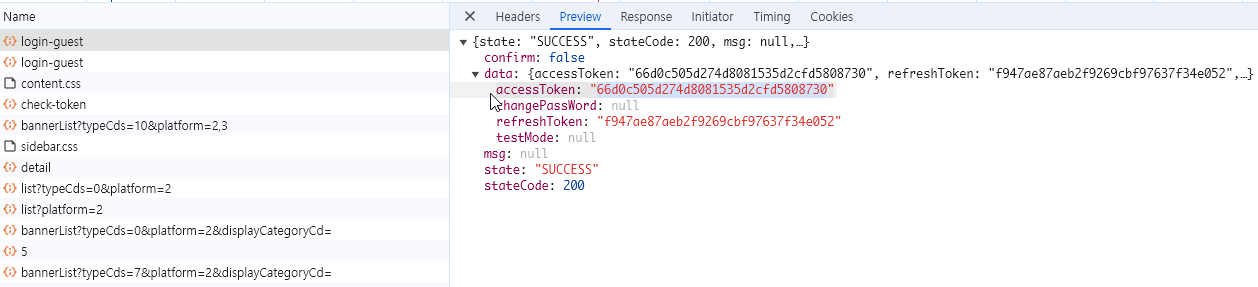
먼저 login-guest로 접속해서 돌아온 JSON 데이터에서 Json("data")("accessToken") 값으로 토큰 값을 구한 다음
https://www.ypbooks.co.kr/back_shop/base_shop/api/v1/search_indexes/result/product?type=product&collection=yp_product&nationType=korea%2Cjapan%2Cwestern%2Cstationerygift&query=978893643412~~~ 로 접속할 때 RequestHeader 의 Guestaccesstoken 값과 함께 접속합니다.
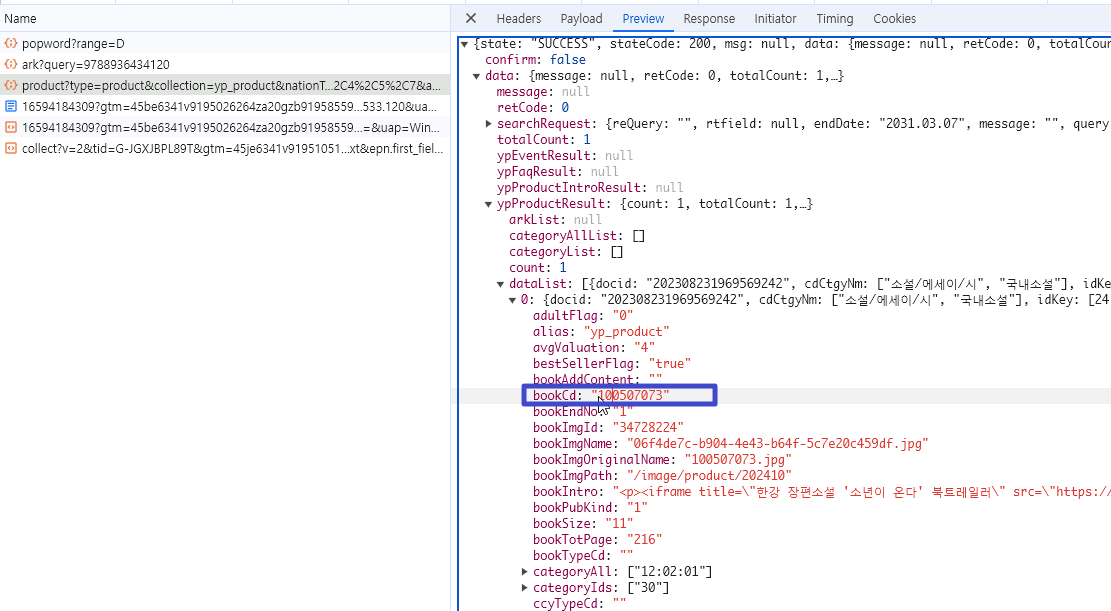
Json("data")("ypProductResult")("dataList") 의 첫번째 배열값에서 "bookCd" 값이나 ProductIdCd 값으로 부터 100507073 이라는 내부 상품코드를 구할 수 있습니다. productPrice 값에서 가격을 알 수 있습니다.
이제 매장별 재고를 알아내기 위해 다음 주소로 접속합니다.
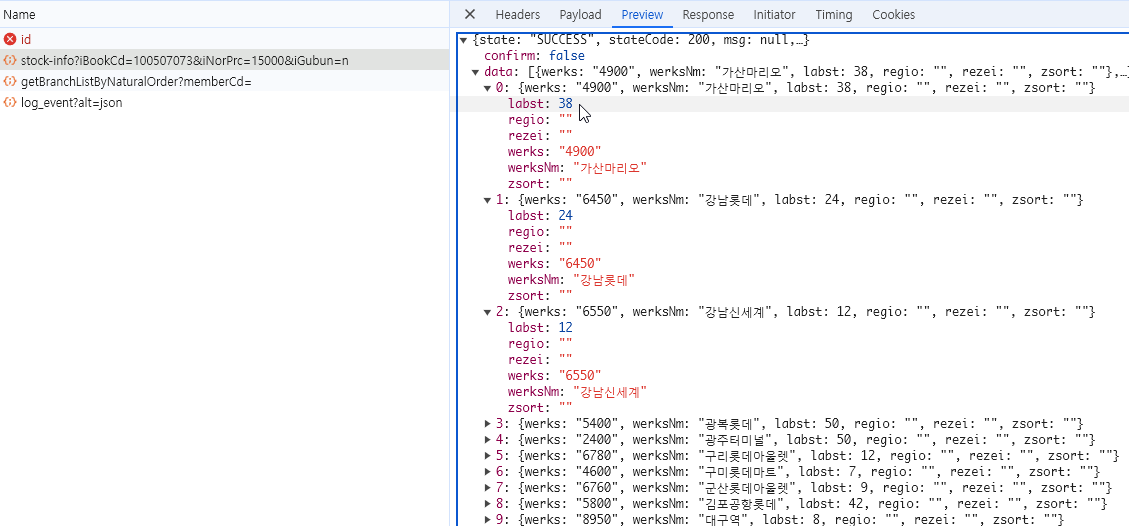
Json("data") 의 각 배열 속의 "labst" 값에서 매장별 재고 수량을 가져옵니다.

아래 그림처럼 주어진 ISBN 코드로 검색해서 매장별 수량을 일괄로 파악할 수 있습니다.
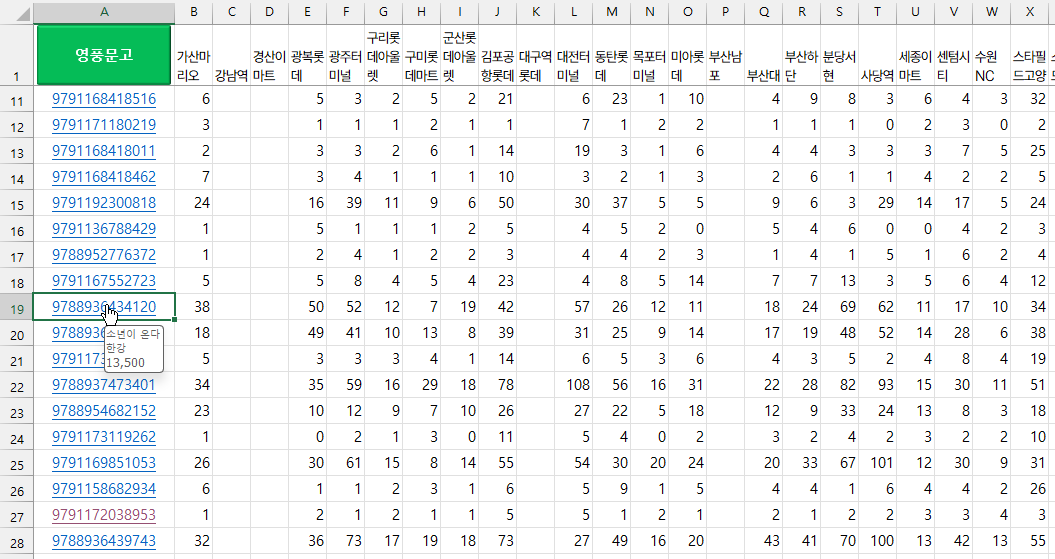
영풍문고 검색 VBA코드는 아래와 같습니다.
Option Explicit

Dim http As Object  'New MSXML2.ServerXMLHTTP60
Dim Json As New JsonBag, itm As New JsonBag
Dim sToken As String

Sub getYP()

    Dim sht As Worksheet
    Dim lastrow As Long, lastcol As Long, l As Long
    Dim rng As Range, irng As Range
    Dim ret As Long

    Set sht = ActiveSheet
    lastrow = sht.Cells(sht.Rows.Count, "A").End(xlUp).Row
    If lastrow < 2 Then Exit Sub
    lastcol = sht.Cells(1, sht.Columns.Count).End(xlToLeft).Column
    If lastcol < 2 Then Exit Sub

    'Application.ScreenUpdating = False
    Set http = CreateObject("MSXML2.XMLHttp")
    sToken = getToken
    If sToken = "" Then MsgBox "Getting GuestAccessToken Failed": Exit Sub

    On Error Resume Next
    For Each rng In sht.Range("A2:A" & lastrow)
        'If Len(Trim(rng.Text)) = 13 Then
        rng.Hyperlinks.Delete
        rng.Offset(, 1).Resize(1, lastcol).Clear
        Call getYPbooks(rng)
        l = l + 1
        Application.StatusBar = "Processing : " & l & " / " & lastrow
        If l Mod 5 = 0 Then Application.Wait (Now + TimeSerial(0, 0, 1))
        'End If
    Next rng
    Application.ScreenUpdating = True
    Set http = Nothing
    Application.StatusBar = False
End Sub

Private Sub test()
    Set http = CreateObject("MSXML2.ServerXMLHttp")
    Debug.Print getYPbooks(Range("A5"))

    Set http = Nothing
End Sub

Function getYPbooks(ISBN As Range) As Long

    Dim url As String, bookUrl As String, bookCd As String, price As String
    Dim Loc As Range
    Dim oSht As Worksheet
    Dim lastcol As Integer, I As Integer

    Set oSht = ISBN.Parent
    lastcol = oSht.Cells(1, oSht.Columns.Count).End(xlToLeft).Column

    'https://m.ypbooks.co.kr/back_shop/base_shop/api/v1/search_indexes/result/product?type=product&collection=yp_product&introSearchField=&listCount=10&pageNumber=1&query=9788972918349&reQuery=&sort=RANK&sortOrder=DESC&startDate=1970.01.02&endDate=&themeType=ALL&rtField=&avgValuation=
    url = "https://m.ypbooks.co.kr/back_shop/base_shop/api/v1/search_indexes/result/product?type=product&collection=yp_product&listCount=10&pageNumber=1&query=" & Trim(ISBN.Text)
    With http
        'Debug.Print URL
        .Open "GET", url, False
        .setRequestHeader "Accept", "application/json, text/plain, */*"
        .setRequestHeader "Content-Type", "application/json"
        .setRequestHeader "User-agent", "Mozilla/5.0"
        .setRequestHeader "Guestaccesstoken", sToken '"30695cefcc1d8e05be56f8ee511218e1"
        .send

        Json.Json = .responseText
        'Debug.Print Json.Json
        '  "state": "SUCCESS",
        '  "stateCode": 200,
        '  "data": {
        '  "ypProductResult": {
        '      "count": 1,
        '      "totalCount": 1,
        '      "dataList": [
        '        {
        '          "docid": "202406106586248084",
        '          "cdCtgyNm": [
        '            "인문",
        '            "세계역사/지리"
        '          ],
        '          "salePrice": 19800,
        '          "recoValuation": 14213,
        '          "productCd": "202406106586248084",
        '          "productIdCd": "9788972918349",
        '          "productName": "노마드 - 문명을 가로지른 방랑자들 유목민이 만든 절반의 역사",
        '          "writerName": [
        '            "앤서니 새틴"
        '          ],
        '          "translatorName": [
        '            "이순호"
        '          ],
        '          "pubCompanyName": "까치글방",
        '          "productPrice": "22000",
        '          "categoryIds": [
        '            "659"
        '          ],
        '          "productReviewCount": "0",
        '          "bookImgPath": "/image/product/202406",
        '          "keywords": "[\"유목민\",\"세계사\",\"인류사\",\"유전자\",\"역사\",\"방랑자\"]",
        '          "clickCnt": "1149",
        '          "bookImgName": "0622cfd1-1de7-46aa-a976-d4790e946d5c.jpg",
        '{"state":"SUCCESS","stateCode":200,"msg":null,
        '"data":{"message":null,"retCode":0,"totalCount":0,"searchRequest":
        '{"reQuery":"","rtfield":null,"endDate":"2029.07.07","message":"","query":"9788954737517","collection":"yp_product","listCount":10,"pageNumber":1,"startDate":"1970.01.01","sort":"RANK","sortOrder":"DESC","nationType":"","cateCode":"","themeType":"","prefix":"","startPrice":-1,"endPrice":-1,"introSearchField":"","revValuation":-1,"eventStatus":"","success":true,"productPrice":"","endType":"-1"},"ypProductResult":{"count":0,"totalCount":0,"dataList":[],"categoryList":[],"nationList":[{"nationName":"korea","nationCount":0},{"nationName":"japan","nationCount":0},{"nationName":"western","nationCount":0}],"categoryAllList":[],"arkList":null,"deliveryConditionList":null},"ypProductIntroResult":null,"ypProductReviewResult":null,"ypThemeResult":null,"ypEventResult":null,"ypFaqResult":null},"confirm":false}


        'If Json("state") Like "FAIL" Then getYPbooks = -1: Exit Function
        If Json("data")("ypProductResult")("totalCount") < 1 Then
            Debug.Print "Result 0 : " & ISBN.Text
            getYPbooks = -1: Exit Function
        End If

        Set itm = Json("data")("ypProductResult")("dataList")(1)
        bookUrl = "https://m.ypbooks.co.kr/bookDetail/" & itm("productCd")
        ISBN.Hyperlinks.Add ISBN, bookUrl, , itm("productName") & vbNewLine & itm("writerName")(1) & vbNewLine & Format(itm("salePrice"), "###,###,##0")
        bookCd = itm("bookCd")
        price = itm("productPrice")
        If bookCd = "" Or price = "" Then getYPbooks = -1: Exit Function
    End With

    'Debug.Print bookCd, price
    'https://m.ypbooks.co.kr/back_shop/base_shop/api/v1/product/stock-info?iBookCd=101298565&iNorPrc=22000&iGubun=y
    url = "https://m.ypbooks.co.kr/back_shop/base_shop/api/v1/product/stock-info?iBookCd=" & bookCd & "&iNorPrc=" & price & "&iGubun=y"
    'Debug.Print URL
    With http
        .Open "GET", url, False
        .setRequestHeader "Accept", "application/json, text/plain, */*"
        .setRequestHeader "Content-Type", "application/json"
        .setRequestHeader "User-agent", "Mozilla/5.0"
        .send
        '{
        '    "state": "SUCCESS",
        '    "stateCode": 200,
        '    "msg": null,
        '    "data": [
        '        {
        '            "werks": "4900",
        '            "werksNm": "가산마리오",
        '            "labst": 1,
        '            "regio": "",
        '            "rezei": "",
        '            "zsort": ""
        '        },
        Json.Json = .responseText
    End With

    If Json("state") Like "FAIL" Then getYPbooks = -1: Exit Function

    'Debug.Print Json.Json
    '각 지점 data 순환
    For Each itm In Json("data")
        'Debug.Print itm("werksNm") & ",";
        '지점별 검색
        For Each Loc In oSht.Range("B1", oSht.Cells(1, lastcol))
            If itm("werksNm") = Loc Then
                oSht.Cells(ISBN.Row, Loc.Column) = itm("labst") '지점이름과 같으면 재고 현황 입력
            End If
        Next Loc
    Next itm
    ISBN.HorizontalAlignment = xlCenter
End Function

Function getToken() As String


    Dim http As Object
    Dim cookie As String

    Set http = CreateObject("MSXML2.ServerXMLHTTP")

    With http
        .Open "PUT", "https://m.ypbooks.co.kr/back_login/base_login/api/v1/auth/login-guest", False
        .setRequestHeader "Accept", "application/json, text/plain, */*"
        .setRequestHeader "Referer", "https://m.ypbooks.co.kr/search_result"
        .setRequestHeader "User-agent", "Mozilla/5.0"
        .send

        'Application.Wait Now + TimeSerial(0, 0, 1)
        'cookie = .getResponseHeader("Set-Cookie")
        'Debug.Print .getAllResponseHeaders
        Json.Json = .responseText

        If Json("state") Like "FAIL" Then Exit Function
        getToken = Json("data")("accessToken")

    End With
    'Set http = Nothing
End Function
마찬가지로 서버에 부담을 줄이기 위해 몇초마다 대기 시간을 주는 것이 좋겠습니다.
또한 대량의 도서에 대한 검색은 정식 API를 이용해서 검색하거나 매장의 검색 시스템을 이용하는 것을 권장합니다.
샘플 파일을 첨부합니다.
무분별한 사용을 방지하기 위해 VBA코드에는 암호가 걸려 있습니다.

'XLS+VBA' 카테고리의 다른 글
| 멜론 노래 정보 가져와서 음악파일명 일괄 변경하기 (0) | 2026.03.02 |
|---|---|
| 엑셀 데이터를 다른 창 입력란에 자동으로 일괄 붙여넣기 (0) | 2026.01.22 |
| 엑셀로 영상 편집하기? (1) | 2025.12.15 |
| 엑셀에서 취소선 대신 화살표 등 도형 표시 (0) | 2025.10.14 |
| 엑셀 특정 단어 강조표시 (0) | 2025.10.02 |
| 색상에 따른 합산 (3) | 2025.08.03 |
| QuerySelector를 이용한 다음(DAUM) 뉴스 검색 (1) | 2025.05.30 |
| VBA로 현재 프린터 단면/양면 인쇄 설정 (1) | 2025.03.02 |





최근댓글