

파워포인트 슬라이드쇼에서 <엔터>를 치면 애니메이션이 중단되고 다음 애니메이션으로 넘어갑니다. 더이상 애니메이션이 없으면 다음 슬라이드로 넘어갑니다. 이것은 파워포인트 슬라이드쇼의 정상적인 동작입니다.
이 때 슬라이드쇼에서 <엔터>를 치면 애니메이션이션이 있더라도 무조건 다음 슬라이드로 넘어가는 것을 원하는 경우입니다.
1. 단순한 방법은 키보드 대신 특정부분을 마우스를 클릭해서 다른 슬라이드로 가도록 따로 하이퍼링크를 추가하는 것이 간단한 방법입니다.
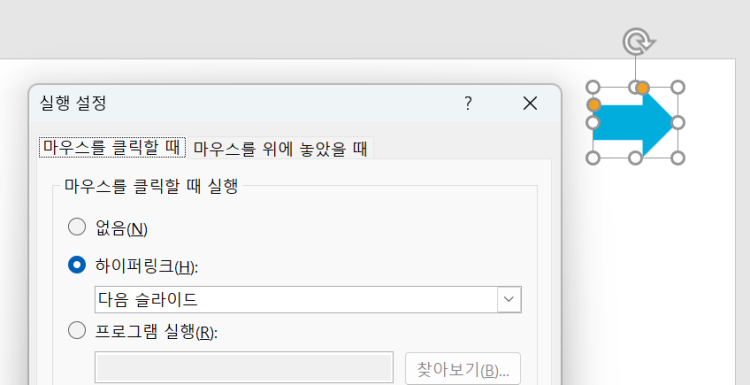
슬라이드 마스터 레이아웃에 링크를 넣어두고 모든 슬라이드에 적용하면 일괄로 처리 가능합니다.
하이퍼링크가 보이는 것 그리고 마우스 클릭으로 넘어가는 점이 단점입니다.
2. 아니면 외부 프로그램이나 VBA의 도움을 받아야 합니다.
VBA로 하려면 실시간으로 키보드 입력을 감시하는 코드가 필요해서 복잡해지므로
외부 Autohotkey 프로그램을 이용해보겠습니다.
아래와 같은 오토핫키 코드로 단축키 프로그램을 실행해 놓으면
엔터키가 눌리면 바로 다음 슬라이드로 넘어가게 할 수 있습니다.
#IfWinActive, ahk_class screenClass ;frameClass
$ENTER::
	try {
		App := ComObjActive("PowerPoint.Application")
		Prs := App.ActivePresentation
		pos := Prs.SlideShowWindow.View.CurrentShowPosition + 1
		if ( pos <= Prs.Slides.Count ) {
			App.SlideShowWindows(1).View.GotoSlide(pos, -1)
		;Sleep, 100
		}
	}
	catch e {
		;no ppt
		if (!app) {
			MSgBox, PPT application not found.
		}
		else {
			MsgBox, % e.Message
		}
	}

return
첨부파일 EXE를 실행하면 아래 창이 뜹니다. 확인을 누르면 상태표시줄로 최소화됩니다.
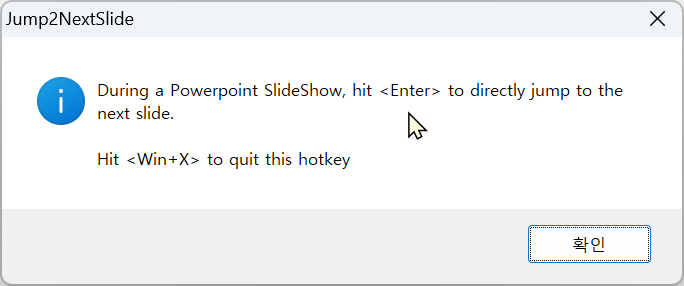
이제 슬라이드쇼에서 엔터를 치면 애니메이션이 진행중이어도 바로 다음 슬라이드로 진행합니다.
스페이스나 방향키는 기존대로 다음 애니메이션단계로 넘어갑니다.
아래 예시에서 1슬라이드에서 스페이스키를 누르면 다음 애니메이션 단계로 가서 멈추지만
2슬라이드에서 엔터를 누르면 바로 다음 3슬라이드로 넘어갑니다.
10,11,12 슬라이드도 애니메이션이 올라오지만 엔터키를 눌러서 바로 다음 슬라이드로 넘어갑니다.

현재 일반 파워포인트 슬라이드쇼와 발표자 보기에서 작동합니다.
(창 클래스 이름이 달라서 웹형식 보기에서는 지원하지 않습니다.)
첨부파일 참고하세요.
관련: 지식인
좀 더 범용으로 사용할 수 있게 변경한 버전입니다.
- 바로 이전 슬라이드는 PgUp,
- 바로 다음 슬라이드는 PgDn,
- 마지막으로 본 슬라이드는 BackSpace 키
(애니메이션 초기화하지 않습니다. 이동 후 멈췄던 애니메이션부터 시작합니다.)
#NoEnv  ; Recommended for performance and compatibility with future AutoHotkey releases.
#SingleInstance
SendMode Input  ; Recommended for new scripts due to its superior speed and reliability.

	WinSetTitle, Jump2

	MsgBox,0x40,Jump2,During a Powerpoint SlideShow`,`nhit <PgUp>/<PgDn> to directly jump to the prev/next slide or `nhit <BackSpace> to go back to the last slide viewed`n`nHit <Win+X> to quit this hotkey,15

	if (%A_IsCompiled%)  {
		Menu, Tray, Icon, %A_ScriptName%, 1
	}
	Menu, Tray, NoStandard
	Menu, Tray, Add, Exit, ExitMenu

return


#IfWinActive, ahk_class screenClass ;frameClass
$PGDN::
	try {
		App := ComObjActive("PowerPoint.Application")
		Prs := App.ActivePresentation
		pos := Prs.SlideShowWindow.View.CurrentShowPosition + 1
		if ( pos <= Prs.Slides.Count ) {
			App.SlideShowWindows(1).View.GotoSlide(pos, 0) ;, -1)
		}
	}
	catch e {
		;no ppt
		if (!app) {
			MSgBox, PPT application not found.
		}
		else {
			MsgBox, % e.Message
		}
	}

return

$PGUP::
	try {
		App := ComObjActive("PowerPoint.Application")
		Prs := App.ActivePresentation
		pos := Prs.SlideShowWindow.View.CurrentShowPosition - 1
		if ( pos >= 1 ) {
			App.SlideShowWindows(1).View.GotoSlide(pos, 0)	;, -1)
		}
	}
	catch e {
		;no ppt
		if (!app) {
			MSgBox, PPT application not found.
		}
		else {
			MsgBox, % e.Message
		}
	}

return

$BACKSPACE::
	try {
		App := ComObjActive("PowerPoint.Application")
		Prs := App.ActivePresentation
		pos := Prs.SlideShowWindow.View.LastSlideViewed.SlideIndex
		App.SlideShowWindows(1).View.GotoSlide(pos, 0)	;, -1)
	}
	catch e {
		;no ppt
		if (!app) {
			MSgBox, PPT application not found.
		}
		else {
			MsgBox, % e.Message
		}
	}

return


#IfWinActive
ExitMenu:
#x::
exitapp

'AutoHotKey' 카테고리의 다른 글
| 파워포인트 원하는 편집 슬라이드로 바로 이동 (0) | 2026.01.27 |
|---|---|
| 도형: 자유형 그리기 단축키 (1) | 2025.08.26 |
| 엑셀 현재시간삽입 단축키 초단위로 입력 (2) | 2025.06.09 |
| 엑셀 셀에 그림 삽입시 위치와 크기 변함 옵션으로 자동 설정 (0) | 2025.05.10 |
| 도형(개체)을 표의 셀 한 가운데 위치시키기 (0) | 2025.04.24 |
| 엑셀 페이지방향 바꾸는 단축키 (0) | 2025.04.12 |
| 대화창이나 윈도우가 화면을 벗어났을 때 창위치 드래그 (0) | 2024.11.25 |
| PPT편집창에서 더블클릭으로 링크된 파일 실행하기 (1) | 2024.07.15 |





최근댓글